Integrate the Kennzeichen-Check: activate it yourself, no waiting
With Zevra Kennzeichen-Check you integrate the live check for custom plates (Wunschkennzeichen) yourself. You register, copy your key and add one line of code or one call.
To the Kennzeichen-Check · See coverage · Data security at Zevra
How is the Kennzeichen-Check activated?
Register
Enter company, contact person, email and website. Registration is open to every company.
Confirm your email and copy your key
After confirmation, your test key with 100 free checks appears in the customer area. It is shown once.
Integrate
For the widget you add one line to your page. For the API you send one call from your system.
Try the first check
In the customer area you check a combination and see usage and cost. Then you take out the subscription.
How do I add the widget?
One line before the closing body element is enough. The widget shows the input field, the result and free alternatives and does not take over any styles of your page.
<script src="https://zevra24.de/kc.js"
  data-site-key="IHR_SITE_SCHLUESSEL"
  data-prefix="RE"
  async></script>
The site key is bound to your domain. The secret API key does not belong in a web page.
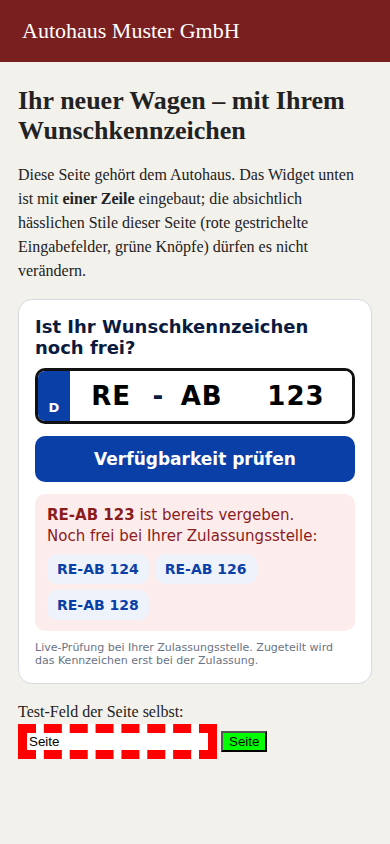
Example: widget in a dealer page, combination taken with 3 free alternatives
How do I call the API?
Every call needs the header X-WKZ-Key with your key. The key belongs in the header, never in the URL and never in the browser.
curl "https://app.zevra24.de/api/kc/v1/search?prefix=RE&letters=AB&numbers=123" \
  -H "X-WKZ-Key: IHR_SCHLUESSEL"
{
 "plate": "RE-AB 123",
 "available": true,
 "reason": "checked",
 "latency_ms": 3771
}Machine-readable description of the API (OpenAPI 3.1)
Which calls are there?
| Call | Purpose |
|---|---|
GET /search | Is this combination free? |
POST /search/batch | Up to 50 combinations in one call |
GET /offices?code=RE | Which registration office belongs to a district code? No key needed. |
GET /usage | Usage and cost of the current period |
POST /reservations | Create a reservation (in preparation, testable in the sandbox) |
GET /reservations/ID | Query the status of a reservation |
curl -X POST https://app.zevra24.de/api/kc/v1/search/batch \
  -H "X-WKZ-Key: IHR_SCHLUESSEL" \
  -H "Content-Type: application/json" \
-d '{"items":[{"prefix":"RE","letters":"AB","numbers":"123"},{"prefix":"RE","letters":"AB","numbers":"124"}]}'What does the answer mean?
| Value of available | Meaning |
|---|---|
true | The authority reports the combination as free |
false | The authority reports it as taken |
null | No statement possible. Never show this as taken. |
Which answers are counted?
| reason | Meaning | Counted |
|---|---|---|
checked | Answer from the authority | yes |
checked_via_twin | Answer from the partner office that manages the code | yes |
check_failed | The authority's portal does not answer, or not reliably | no |
office_not_queryable | The office does not allow automatic checks; portal_url leads to its portal | no |
ambiguous_prefix | The code belongs to several offices; repeat with plz or office_id | no |
unknown_prefix | Unknown code | no |
invalid | The form of the combination is not permitted | no |
How do I test in the sandbox at no cost?
In the customer area you create a sandbox key. It starts with wkz_sbx_, reaches no authority and is not charged. The letters of the combination determine the result.
| Letters | Check | Reservation |
|---|---|---|
OK | free | reserved |
NO | taken | not available |
ER | portal does not answer | portal does not answer |
FE | free | reserved, authority fee of 12,80 € advanced |
QQ | free | stays in the queue |
How do I reserve through the API?
You send the combination and the holder's data with the header Idempotency-Key. The same key with the same content returns the same job, never a second reservation. The answer names the job; the status follows by query or webhook.
Real reservation is in preparation. In the sandbox the flow can be tested at launch.
curl -X POST https://app.zevra24.de/api/kc/v1/reservations \
  -H "X-WKZ-Key: wkz_sbx_IHR_SANDBOX_SCHLUESSEL" \
  -H "Idempotency-Key: auftrag-2026-0001" \
  -H "Content-Type: application/json" \
  -d '{"prefix":"RE","letters":"OK","numbers":"123","customerReference":"Auftrag 0001",
"halter":{"name":"Mustermann","vorname":"Max","plz":"45657","ort":"Recklinghausen"}}'{
"id": "RES-7F3K2M9Q",
"status": "queued",
"environment": "sandbox",
"plate": "RE-OK 123",
"customerReference": "Auftrag 0001",
"reservationCode": null,
"authorityFeeAdvancedCents": 0
}How do I learn the status of a reservation?
In the customer area you store an https address. Zevra sends the event reservation.updated on every status change. Every message is signed with HMAC-SHA256.
- X-Zevra-Timestamp names the time of the message in seconds.
- X-Zevra-Signature is HMAC-SHA256 over timestamp, dot and body, with your secret.
- If your system does not answer with 2xx, Zevra repeats the delivery after 1, 5, 30, 120 and 720 minutes.
import hmac, hashlib

def echt(secret, timestamp, body, signature):
    soll = hmac.new(secret.encode(), f"{timestamp}.{body}".encode(), hashlib.sha256).hexdigest()
return hmac.compare_digest(soll, signature)Which errors does the API report?
| HTTP | error | Meaning |
|---|---|---|
| 401 | unauthorized | Key missing or invalid |
| 403 | revoked | Key is no longer active |
| 403 | subscription_required | Reservation only with an active subscription |
| 409 | idem_conflict | The idempotency key was already used with different content |
| 429 | quota_exhausted | Monthly limit reached; checking pauses until the next period |
| 429 | rate_limited | More than 120 requests in one minute |
Which response times and limits apply?
- Response time of a check, measured over 7 days and 7.020 checks: half under 4,2 seconds, 75 % under 7,3 seconds, 95 % under 14,6 seconds.
- An answer arrives after 58 seconds at the latest. Please set your timeout to 65 seconds.
- Each key allows 120 requests per minute. A batch search counts per combination.
- A free plate is not an allocation. The plate is allocated only at registration.
Questions about the integration
Do I need a developer for the widget?
How long does activation take?
What happens after the 100 trial checks?
Which data is transmitted?
Does the key belong in the browser?
More about the Kennzeichen-Check
Kennzeichen-Check · Kennzeichen-Check coverage · Kennzeichen-Check for shops · Kennzeichen-Check for registration services · Kennzeichen-Check status
Ready for the first check?
50 € base fee per month · 0,05 € per check · 100 checks free to try